How to create rotator
A rotator is a powerful tool that allows you to distribute incoming traffic between multiple links using a single central URL.
Think of a rotator as a container link. Instead of sending traffic directly to one destination, you send it to the rotator. Inside the rotator, you place several destination links. When someone clicks the rotator link, the system automatically decides which destination link will receive that click.
For example:
- You create one rotator link (the container).
- Inside the rotator, you add three destination links.
- When traffic arrives at the rotator, it will be redirected to one of those three links based on the rotation mode you choose.
This makes rotators extremely useful for testing pages, distributing traffic between offers, or managing multiple campaigns.
Let's create
To create a rotator, go to Rotators section of Udimi. And click the Create button. You will see a window that asks for name, link, rotation mode and the fallback URL
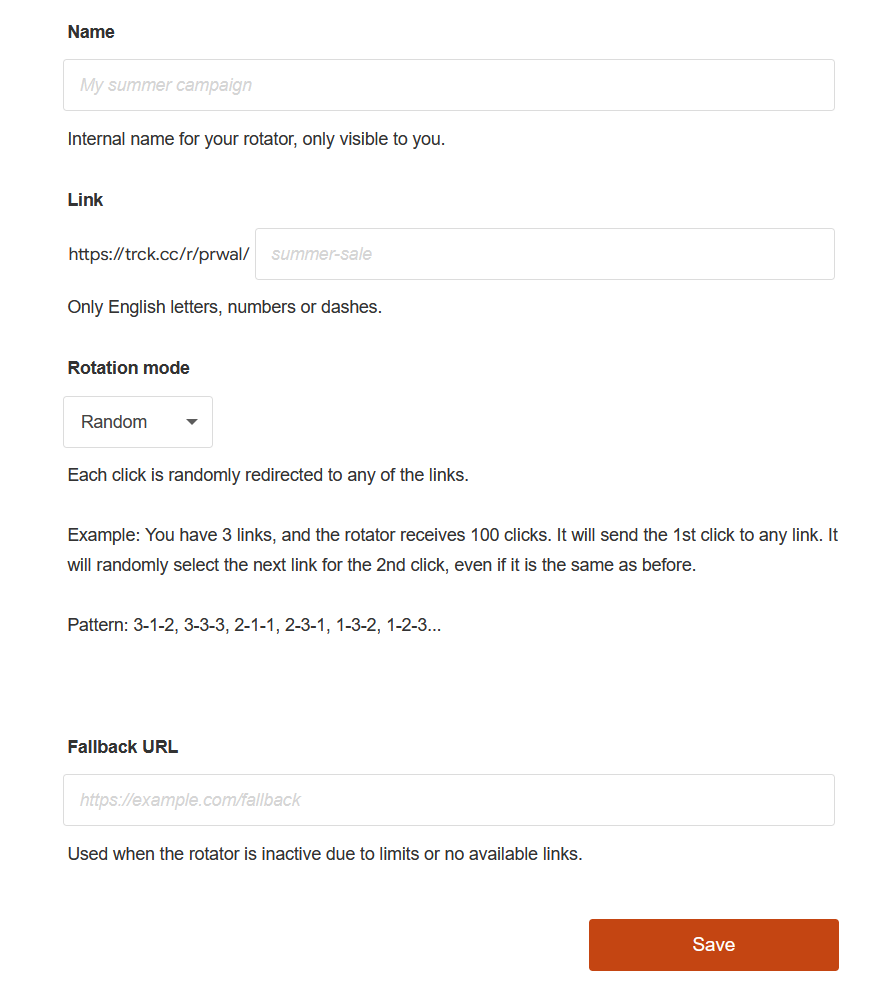
Name - Specify a name for your new rotator. It will be visible only to you and will help you differentiate your rotators.
Link. Your rotator will always have a link that starts with https://trck.cc/r/, but you can define the ending part of the URL. You can use only English letters, numbers, or dashes here, just like in any internet link.
Rotation Modes
The rotator supports three different rotation modes, each designed for a specific purpose.
Random Rotation
In Random mode, the rotator sends incoming traffic to one of the links randomly.
Example:
You have three links inside your rotator:
- Link A
- Link B
- Link C
Every time a visitor clicks the rotator link, the system randomly chooses one of these links.
So the traffic flow may look like this:
- Click 1 → Link B
- Click 2 → Link A
- Click 3 → Link C
- Click 4 → Link A
- Click 5 → Link B
There is no strict order. Each click is randomly assigned to one of the available links.
This mode is useful when you want natural traffic distribution, such as when running experiments or sending traffic to multiple offers without a fixed order.
Sequential Rotation
In Sequential mode, the rotator sends traffic to each link one by one in order, filling each link until its click limit is reached.
Example:
You have three links:
- Link A (limit: 100 clicks)
- Link B (limit: 100 clicks)
- Link C (limit: 100 clicks)
Traffic will be distributed like this:
- All clicks go to Link A until it reaches 100 clicks.
- Then the rotator starts sending traffic to Link B.
- After Link B reaches its limit, traffic goes to Link C.
So the order is:
Link A → Link B → Link C
This mode is useful when you want to fill campaigns in a specific order, for example when delivering traffic to clients sequentially.
Balanced Rotation
In Balanced mode, the rotator ensures that all links receive traffic equally.
Instead of filling one link completely before moving to the next, the system distributes clicks evenly across all links.
Example with three links:
- Link A
- Link B
- Link C
Traffic will be distributed like this:
- Click 1 → Link A
- Click 2 → Link B
- Click 3 → Link C
- Click 4 → Link A
- Click 5 → Link B
- Click 6 → Link C
And the pattern continues:
A → B → C → A → B → C
This ensures that all links receive roughly the same number of clicks.
Balanced rotation is ideal for:
- A/B testing
- Fair traffic distribution
- Comparing landing page performance
Fallback Link
Another important setting is the Fallback Link.
A fallback link is a backup destination used when the rotator cannot send traffic to any of the configured links.
This can happen for several reasons, for example:
- A link has reached its click limit
- All links inside the rotator are paused or inactive
- Traffic does not meet the required criteria
When this happens, the rotator automatically redirects the visitor to the fallback link instead.
This ensures that no traffic is lost, and every click always goes somewhere useful.